Multiworld
How to create a world specific configuration file ?
Create an empty .yml file according to a world name on your server (unzip and rename it). Example: world_config.yml (the _ is required! and everything is case sensitive!).
Start-up your server or just run
/ncp reloador/nocheatplus reloadif your server is already running.NoCheatPlus should now write every settings available for world specific configuration in that/those empty yaml files.
If you rather prefer to use some settings of your global config.yml then set "savebackconfig" to false and remove the settings from your world specific configuration file.
Example end result:
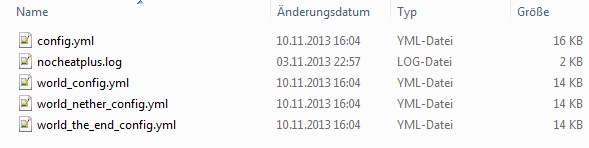
Other examples: WorldName_config.yml, world_nether_config.yml, world_the_end_config.yml, HungerGames_config.yml or BackupWorld_config.yml

Configs that only work in config.yml (Global configuration file)
configversion.notify
configversion.created
configversion.saved
logging.active
logging.exteneded.status
logging.backend.console.active
logging.backend.console.prefix
logging.backend.console.asynchronous
logging.backend.file.active
logging.backend.file.prefix
logging.backend.file.filename
logging.backend.ingamechat.active
logging.backend.ingamechat.prefix
logging.backend.ingamechat.subscriptions
data.expiration.active
data.expiration.duration
data.expiration.history
data.consistencychecks.active
data.consistencychecks.interval
data.consistencychecks.maxtime
data.consistencychecks.suppresswarnings
protection.plugins.hide.active
protection.plugins.hide.nopermission.message
protection.plugins.hide.nopermission.commands
protection.plugins.hide.unknowncommand.message
protection.plugins.hide.unknowncommand.commands
protection.commands.consoleonly.active
protection.commands.consoleonly.message
protection.commands.consoleonly.commands
protection.clients.motd.active
protection.clients.motd.allowall
checks.chat.commands.exclusions
checks.chat.commands.handleaschat
checks.chat.text.global.words.active
checks.chat.text.global.prefixes.active
checks.chat.text.global.similarity.active
checks.chat.text.player.words.active
checks.chat.text.player.prefixes.active
checks.chat.text.player.similarity.active
checks.moving.survivalfly.hover.step
checks.net.flyingfrequency.seconds
checks.net.flyingfrequency.packetspersecond
checks.net.flyingfrequency.reduceredundant.seconds
compatibility.exemptions
compatibility.exemptions.remove
compatibility.exemptions.remove.join
compatibility.exemptions.remove.leave
compatibility.managelisteners
compatibility.bukkitapionly
compatibility.blocks
compatibility.blocks.breakingtimes
compatibility.blocks.allowinstantbreak
compatibility.blocks.overrideflags
compatibility.blocks.overrideflags.snow
The world name is case sensitive (MiningWorld, theWorld etc.).
You can set savebackconfig to false, in order to not have NoCheatPlusFork add default values to a config file. Thus you can override just the values you are interested in and keep a minimal world-specific configuration file.
WorldName_config.yml has always higher priority then config.yml. So NoCheatPlusFork will first apply all settings from config.yml and then override them for a specific world using WorldName_config.yml
Some settings can only be used in the global config.yml and aren't multiworld compatible (Please don't just copy config.yml and rename it to WorldName_config.yml or similar.)
World specific files can be created, changed or removed while your server and NoCheatPlusFork are running. Just use the /ncp reload
If a world gets unloaded, deleted or renamed then automaticly ignore your world specific configuration files you made for it
Last updated