This page lists all the config options that apply to the multiple existing features.
Active
This is a simple switch to enable or disable features throughout the configuration.
True: Enables a feature
False: Disables a feature
Default: This feature will be enabled or disabled by NoCheatPlus, based on a determined condition (eg.: if the server is > 1.9)
Set up a custom configuration
We will be using the following string as an example for our walkthrough.
actions: vl>2 log:fdirectionlowvl:5:6:i vl>10 cancel log:fdirection:2:4:if vl>50 cancel log:fdirection:0:7:icf cmdc:kicksuspiciouscombat:1:5
Actions
The actions entry can be considered as NoCheatPlus' task scheduler and can be found at the end of a given check's options. This is the only place where you can control what a check should do after reaching a determined violation level.
vl>X To be interpreted literally, it means "violation greater than X". This is used to articulate actions into different intervals. After a player has reached the defined violation threshold, the subsequent interval will be executed. In other words, the vl>X is a limiter to how many actions can be performed in a given interval. An interval may be left undefined at the start (e.g.: vl>2 cancel (...)), but the actions section cannot be left blank as a whole.
cancel is the flag used to indicate that an action is to be cancelled, this can have several meanings:
-Cancel an event (prevent) (i.e.: prevent illegal moves by setting the player back, or cancel illegal hits in combat.);
-Undo actions done by players in some other way (i.e.: restore altered fall damage or fall distance);
-Do something that should've been done (enforce) (i.e.: enforcing damage if players ignore its source (GodMode));
Note that the cancel flag currently supports cancellation with probability: instead of cancelling an action 100% of the time, you can tell NoCheatPlus that said action only has a probability of actually getting cancelled, by specifying the probability in percentage (x%) before the cancel flag (e.g.: 10%cancel). Can be used in combat, for instance, to not immediately cancel a hit.
Taking the previously illustrated example:
Interval 1: If players don't reach at least 2 VL, NoCheatPlus will do nothing, as we don't have anything specified before 2 VL.
Interval 2: After a player has reached at least 2 VL the log action will be executed.
Interval 3: After 10 VL we then start to cancel whatever has been detected by the check and execute the log action.
Interval 4: In the final interval, after a player has reached VL 50, we cancel, then log and finally we execute the cmdc action (which will kick the player in this case).
Strings usage
Strings are defined at the file's bottom part; you can think of them as aliases. A string can be used to either log something into NoCheatPlus' logging stream or execute a command. This enables server owners to do almost anything they wish to do upon detections.
cmd and cmdc are used to tell NoCheatPlus to execute a command action. The latter will force NoCheatPlus to recognize color codes (&).
log is used to tell NoCheatPlus to log a message into its logging stream (console, in-game or flat file).
The template for strings is as it follows:
Do note that normal messages need start and ending quotes. (eg.: 'your message here').
Taking the previously illustrated example:
The default message for the fdirectionlowvl string is as it follows:
fdirectionlowvl: '&c[player]&7 failed &c[check]&7: could be using an aimbot (hit not canceled) &7(&cVL[violations]&7)'
While the command for kicksuspiciouscombat is like this:
kicksuspiciouscombat: ncp kick [player] &c&l(!)&7 Illegal combat modifications.
 The
The 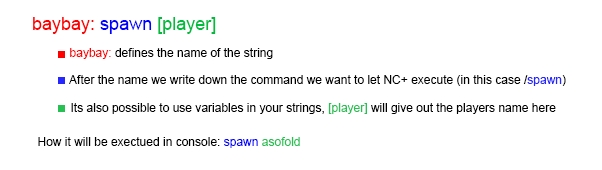 Do note that normal messages need start and ending quotes. (eg.: 'your message here').
